
Night Racing
Take the wheel after dark
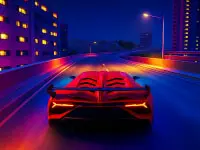
Night Racing puts you behind the wheel of a sports car in a 3D city at night. You can drive through illuminated streets, take on missions, perform driving tricks, and try to leave pursuing police behind. The game is free to play in your browser, so you can get on the road without a download.
Your immediate job is simple: keep the car moving and stay in control. Acceleration gets you up to speed, while braking helps when the streets demand a quick correction. Steering cleanly matters, but the handbrake gives you another option when you want to slide the car through a turn. The city setting makes each drive feel like a nighttime run rather than a closed daytime circuit.
How Night Racing plays
You explore the city while completing missions and showing your driving skills. Police pursuits add pressure to the drive. You need to create distance and avoid letting the chase slow you down. The game also gives you room to perform tricks, so driving is not limited to following a single racing line.
Drifting is a useful part of the action. Press the handbrake as you enter a corner, then steer through the slide and accelerate out. A controlled drift can help you change direction without losing the playful street-racing feel. Holding the handbrake for too long can leave you fighting to straighten the car, so timing is worth practicing.
Progress gives you access to cooler and faster cars. That provides a clear reason to keep driving and complete more of the game. A new car is not just a visual reward when it also offers more speed. You can work through the available vehicles and see how each faster option changes your runs through the city.
Nitro adds another burst of speed, but it becomes available from the third car. That means your early progress matters before you can use the boost. Once it is available, press F when you want extra pace. You may find it useful when opening a gap during a pursuit or accelerating through a clear section of road.
Controls and driving tools
The desktop controls give you direct access to the car and several useful views. Press W to accelerate. Press S to brake or reverse. Use A and D to steer left and right. Space activates the handbrake for sharper turns and drifts.
Press C to switch the camera. You can also move the mouse to rotate the camera. These options let you adjust how you look around the car while driving. If you need a better sense of the surrounding streets, press M to enlarge the map.
Night driving comes with extra vehicle controls. Use L and K to control the lights. Press I to start or stop the engine. These inputs let you interact with more than steering and speed, while Escape or Tab opens the menu when you need it.
The full desktop control list is:
- W: accelerate
- S: brake or reverse
- A: steer left
- D: steer right
- Space: handbrake
- F: nitro from the third car
- M: enlarge the map
- L or K: control the lights
- I: start or stop the engine
- C: switch the camera
- Mouse: rotate the camera
- Escape or Tab: open the menu
A good first approach is to learn braking and steering before leaning on the handbrake. Once you can keep the car settled, add short handbrake taps on tighter corners. Switch the camera if your current view makes it hard to judge the road. Use the enlarged map when you need more awareness of the city.
Why return for another drive
Night Racing combines city driving, missions, tricks, police escapes, drifting, and vehicle progression. You can focus on cleaner steering during one run, then try bolder handbrake turns during the next. Police pursuits give you a moving challenge, while the mission structure gives your driving a purpose.
Unlocking faster cars creates a practical progression goal. Reaching the third car also opens nitro, adding another tool to your controls. That makes continued play useful as well as rewarding. You are not only repeating the same drive; you are working toward new vehicles and an extra way to manage speed.
If you enjoy learning a route through practice, Night Racing gives you several skills to refine. You can improve your corner entry, shorten your drifts, choose better moments to accelerate, and learn when to check the map. The playful nighttime setting ties those actions together without making the controls difficult to understand. Start the engine, choose your camera, and see how confidently you can handle the city after dark.
Tags
FAQ
What do you do in Night Racing?
You drive through a 3D city at night, complete missions, perform driving tricks, and try to escape police pursuits.
How do you control the car?
Use W to accelerate, S to brake or reverse, and A and D to steer. Press Space to use the handbrake.
How do you use nitro?
Press F to activate nitro. Nitro becomes available from the third car.
Can you unlock more cars?
Yes. Continued play lets you unlock cooler and faster cars.
How do you change the camera?
Press C to switch the camera, and move the mouse to rotate the view.
Is Night Racing free to play?
Yes. You can play Night Racing for free in your browser.